
App Watcher: Check Update1.7.0 - Google Play
You'll be able to see results in few seconds.
Publisher Description


Track apps updates from Google Play Market on your device
👉 App Watcher is What’s New application manager that updates changelog from Play Store even the applications are not installed currently on your device and provides quick access to the "What's new" section.
You can follow app updates for Android even if app not installed, know about new features, bug fixes and levels for games.
The notifier checks daily applications update list in Play Store and will notify you when there is a new version available.
💥 Features:
+ Add an application from Play Market to appwatch list (Use Share)
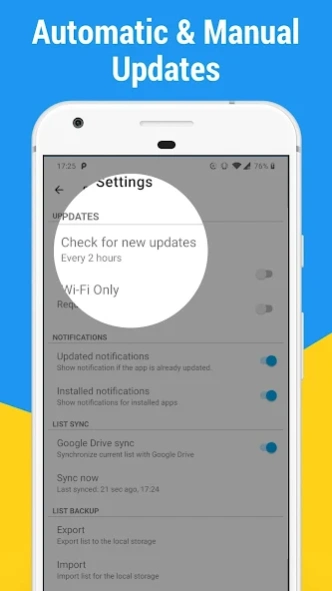
+ Manual or auto update
+ Quick shortcut to see what's new / change log in application
+ Share application
+ Update notifier
+ Google Drive backup
+ Filter list by: Installed/Not installed apps
🔺Join Beta version:🔺
https://play.google.com/apps/testing/com.anod.appwatcher
📱 Permissions:
* Internet access - to receive notifications in my mobile.
* View network state - for WiFi only setting
* Read/write sync settings - change synchronization parameters.
* Discover accounts, read Google configuration - to communicate with Google Play Store.
* Access storage - for Import/Export of the list.
Open new features for mobile every day with our updater app. Make software update on your apps list with smart installer, appfollow and stay up to date.
About App Watcher: Check Update
The company that develops App Watcher: Check Update is AppFollow. The latest version released by its developer is 1.7.0.
To install App Watcher: Check Update on your Android device, just click the green Continue To App button above to start the installation process. The app is listed on our website since 2026-05-25 and was downloaded 0 times. We have already checked if the download link is safe, however for your own protection we recommend that you scan the downloaded app with your antivirus. Your antivirus may detect the App Watcher: Check Update as malware if the download link to com.anod.appwatcher is broken.
How to install App Watcher: Check Update on your Android device:
- Click on the Continue To App button on our website. This will redirect you to Google Play.
- Once the App Watcher: Check Update is shown in the Google Play listing of your Android device, you can start its download and installation. Tap on the Install button located below the search bar and to the right of the app icon.
- A pop-up window with the permissions required by App Watcher: Check Update will be shown. Click on Accept to continue the process.
- App Watcher: Check Update will be downloaded onto your device, displaying a progress. Once the download completes, the installation will start and you'll get a notification after the installation is finished.
Program Details
System requirements
Download information
Pricing
Version History
version 1.7.0
posted on 2026-05-25
Redesigned navigation for a smoother, more consistent experience.Better layouts on tablets and foldables.Faster app startup and smoother scrolling.Target SDK 36
version 1.7.0
posted on 2026-05-25
Redesigned navigation for a smoother, more consistent experience.
Better layouts on tablets and foldables.
Faster app startup and smoother scrolling.
Target SDK 36
version 1.7.0
posted on 2026-05-25
Redesigned navigation for a smoother, more consistent experience.
Better layouts on tablets and foldables.
Faster app startup and smoother scrolling.
Target SDK 36
version 1.6.9
posted on 2024-10-23
Support for Android 15
version 1.6.5
posted on 2024-09-08
1.6.5
Untagged section
Upgrade libs
1.6.4
Target Android 14
Pin tag screen as a launcher shortcut via menu
1.6.2
Enable swipe gesture to open drawer
Fix color issue in details when icon lacks palette
Optimize list scrolling performance
Fix details opened from history
Always update local app version from remote
Rename "Recently Updated" section to "Recently Discovered"
Click on date in details to show discover date
Fix import error
version 1.6.0
posted on 2023-02-03
1.6.0
- Migrate to the new Material 3 framework
- Add more info to details screen
- Tweak date parser
- Unify item click action
- Support for resizable screens in more sections
- Add history screen
version 1.4.9
posted on 2022-02-24
Fix creation of backup file on Google Drive
Upgrade libraries
version 1.4.7
posted on 2021-09-17
Simplify tags management, improve tags theming
Upgrade libraries
Keep list position lost when scrolled to the bottom
Migrate setting to Jetpack Compose
Show changelog for recently installed apps
Target Android 11
Migrate to ViewPager2
version 1.4.6
posted on 2020-11-30
- Refresh installed when an app is being uninstalled
- Rewrite main list for faster loading
- Rewrite import installed into recently installed list
- Improve empty state
- Fix watch button in details
- Migrate wishlist and search to the new paging library
- Upgrade libraries
version 1.4.5
posted on 2020-05-09
- Fix Google Drive sync switch off
- Improve changelog comparison - compare only letters and digits
- Improve multi-window, make list resizable for tablets/desktop modes
- Fix memory leak
- Fix double tap opens multiple changelogs
Disclaimer
Official Google Play Link
We do not host the App Watcher: Check Update app on our servers. We did not scan it for viruses, adware, spyware or other type of malware. This app is hosted by Google and passed their terms and conditions to be listed there. We recommend caution when installing it.
The Google Play link for App Watcher: Check Update is provided to you by apps112.com without any warranties, representations or guarantees of any kind, so access it at your own risk.
If you have questions regarding this particular app contact the app developer directly. For questions about the functionalities of the apps112.com website, contact us.
